MCP in practice: building an AI agent that organizes files
Introduction
An LLM can answer questions, but it does not know by itself how to read a folder or call an internal API. Every capability needs an integration point to describe the tool, validate the input, call the real system and bring the result back into the conversation. If every AI application wires itself to every system, n applications and m systems can produce up to n × m adapters to write and maintain.
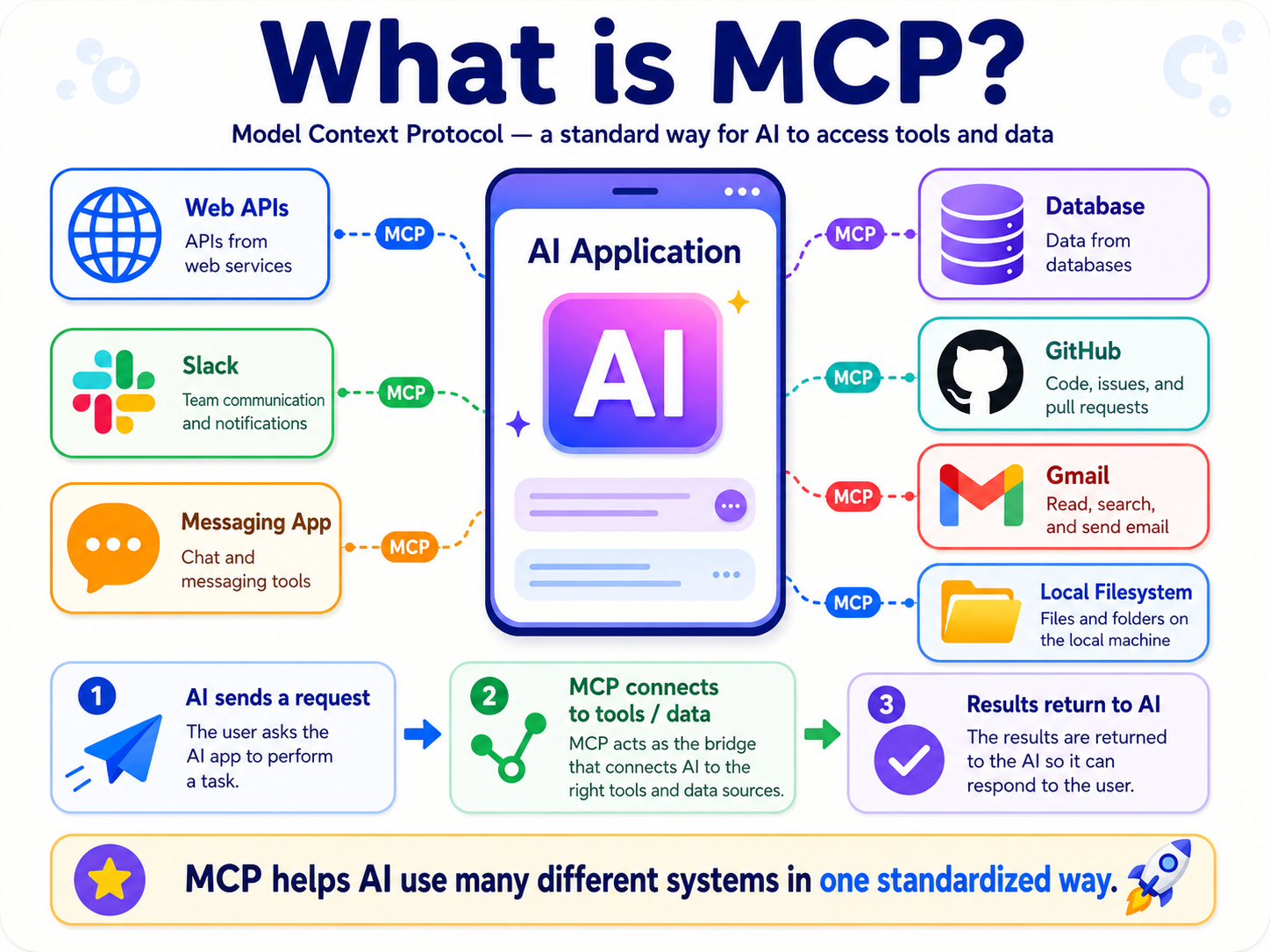
An overview of how MCP connects an AI application to external systems: API, Slack, database, GitHub, Gmail, file system.
The Model Context Protocol (MCP) sets a common contract between the two sides. An MCP Server publishes its capabilities along with input/output schemas; any compatible AI application can discover and call them over the same protocol. Business logic and the real API calls live on the server. The host decides which tools are handed to the model and how confirmation is requested; the server still has to check permissions for the operations it receives. The MCP documentation compares this standardized connection to USB-C.
This article tests that idea with a demo that actually runs: an agent uses two MCP tools to organize 500 mock files by extension and modification date, without reading what is inside the files.
What MCP is: a protocol, not an AI model
MCP is an open specification for the messages exchanged between an AI application and a program that supplies data or actions. It standardizes how the two sides negotiate a version, publish capabilities, describe inputs with a schema, call tools, and return results. MCP does not replace business APIs, does not grant permissions by itself, and does not decide which tool should be called.
In the file-organizing demo, one turn plays out like this:
- The user types a request into the AI application, which is the MCP Host.
- The host creates an MCP Client dedicated to the File MCP Server and establishes the connection.
- The client fetches the tool list from the server through tools/list; the host chooses which tools go into the request sent to the model.
- When the model picks a tool, the host sends tools/call through the client. The server validates the input, operates on the file system, and returns the result.
- The host feeds the tool result back into the conversation so the model can decide the next step.
The three roles in the architecture therefore have fairly concrete boundaries. The host is the application the user has open, such as Claude Desktop, Claude Code or an IDE. The client is the protocol component the host creates. Each client keeps a 1-1 connection with one server. The server is the program that publishes capabilities and does the real work.
Why use MCP instead of a custom API integration
The most visual comparison lies in the number of integrations required.
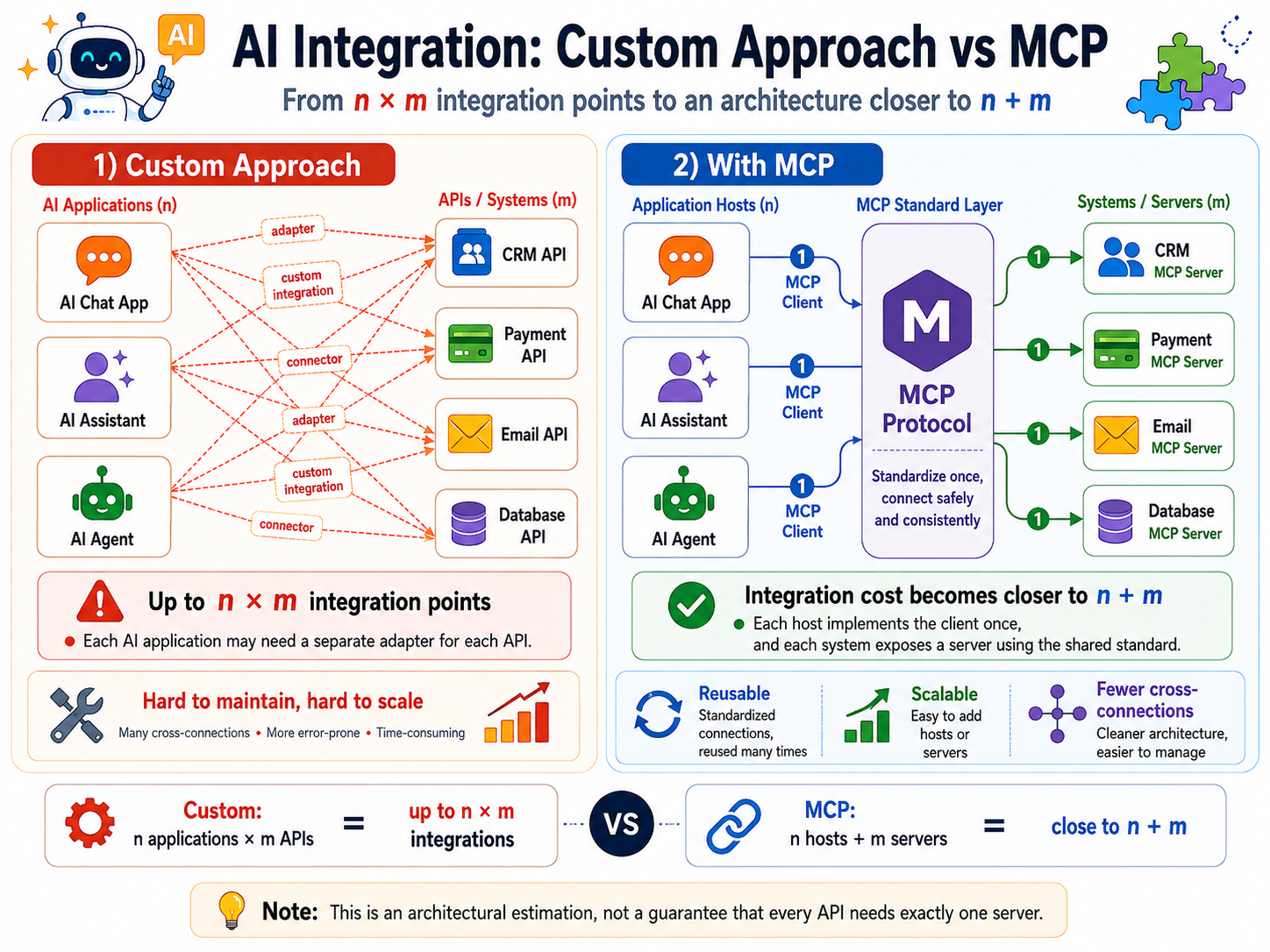
Comparing integration points: custom integration needs up to n × m adapters; MCP brings the cost close to n + m.
With the custom approach, each AI application may need one adapter per API. In the simple model, n applications and m APIs create up to n × m integration points. With MCP, each system publishes one server following a shared standard, and each host implements the client once. When the components are genuinely reusable, the integration cost gets closer to n + m. This is a way of estimating architecture, not a promise that every API needs exactly one server.
A few concrete benefits come with it:
- The server defines the schema, validates input, and executes business logic once for every host that connects to it.
- The host, or the model's adapter, converts the tool contract and the results into the format the provider requires.
- One MCP Server can serve many MCP Clients instead of wiring API-calling code into one specific agent framework.
- The client discovers tools or resources at runtime instead of hard-coding the whole list into the prompt.
- The model only sees the tools the host chooses to put into the request. The confirmation UI and the permission policy depend on the host, the transport, and the server configuration.
A worked use case: an inbox nobody cleaned for a year
Picture a folder nobody has cleaned for a whole year — it might be a real folder on your own machine: screenshots, Word files from meetings, PDF invoices, revenue reports, a few Excel files, all mixed together. Without an agent, reorganizing that pile leaves two options: drag and drop every file by hand, or write a script that classifies by fixed rules (if the extension is X, move it into folder Y). That script has to be edited every time a new file type appears, and it is hard-wired to a single folder — using it on another folder means editing the code again.
The demo in this article recreates exactly that situation: a script generates 500 mock files into a single folder, with each file's modification date spread randomly across the last 365 days, simulating a year without any cleanup.
The user gives one natural-language command plus the path to organize. The agent lists the files and calls move_files; the server itself picks the destination folder from the extension and the modification date, filing each file by type and then by year/month/day.
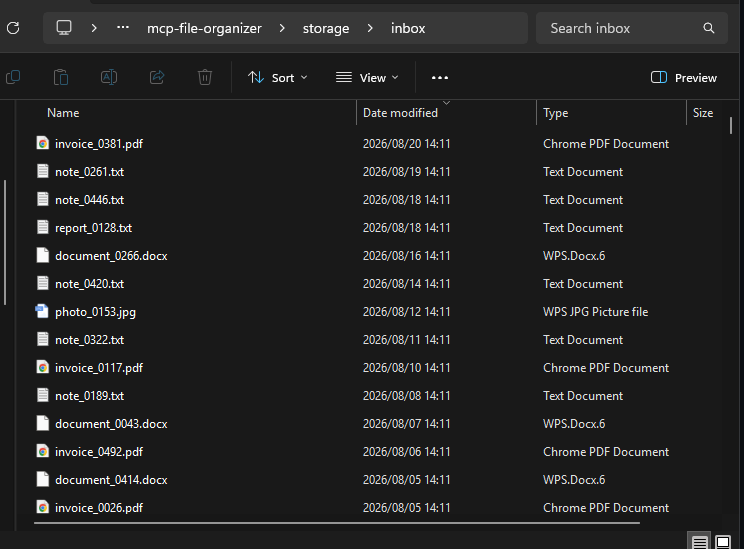
storage/inbox before processing: 500 mock files, many extensions mixed.
Architecture
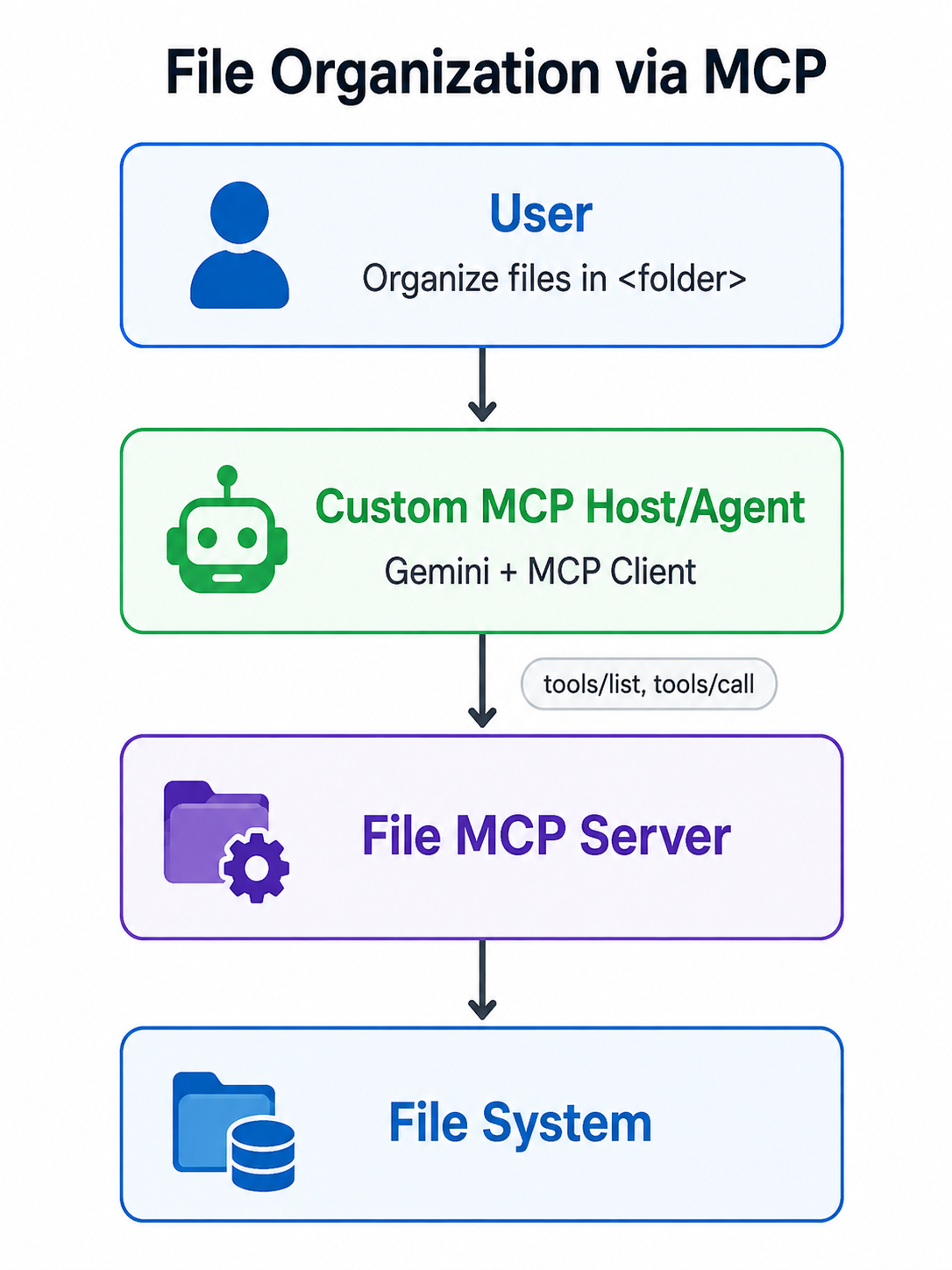
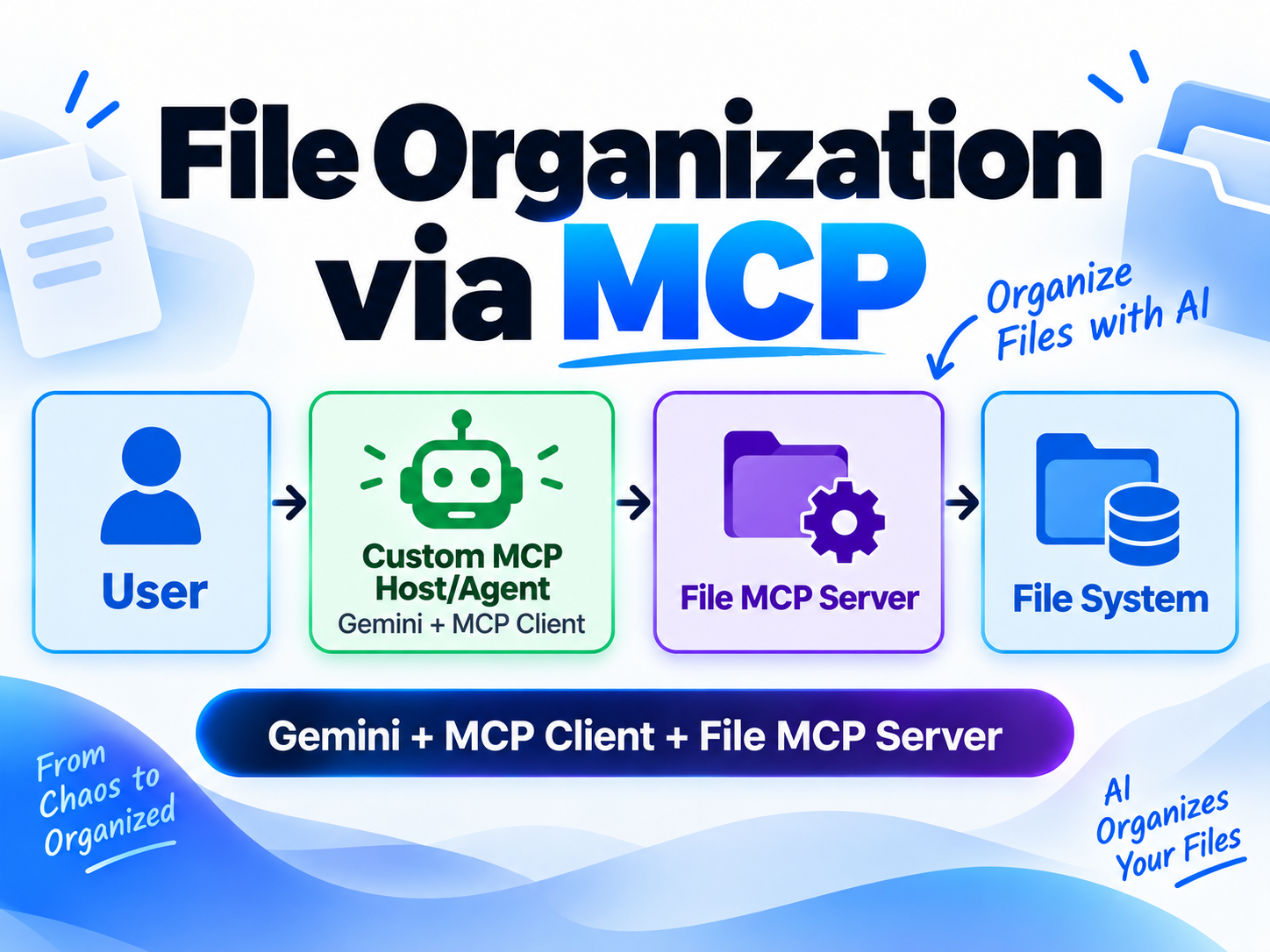
The call flow in the demo: User → Custom MCP Host/Agent (Gemini + MCP Client) → File MCP Server (list_files, move_files) → Local File Storage.
client.ts is the custom host/agent application. The mcpClient variable holds the protocol connection to the server; Gemini picks the tool and arguments. The File MCP Server lists or moves files, and the file system stores the real data.
The server has no tool that reads file contents, so the contents of an invoice, a photo, or a document are never sent to the model. The model sees only the file name, extension, and modification date.
Building the MCP Server: two tools, list_files and move_files — no file-content access
The server registers two tools. The first snippet keeps the schema declaration and the handler of list_files; the helpers that validate paths and read metadata live in the full source.
// server/server.ts

import { McpServer } from "@modelcontextprotocol/server";
import { StdioServerTransport } from "@modelcontextprotocol/server/stdio";
import { z } from "zod";
import fs from "node:fs/promises";
import path from "node:path";

const server = new McpServer({ name: "file-organizer", version: "1.0.0" });
server.registerTool("list_files", {
  description: "List direct child files and their modification dates.",
  inputSchema: z.object({ folder: z.string() }),
}, async ({ folder }) => {
  const root = resolveFolder(folder);
  const entries = await fs.readdir(root, { withFileTypes: true });
  const files = await Promise.all(entries.filter((entry) => entry.isFile()).map(async (entry) => ({
    name: entry.name,
    extension: extensionOf(entry.name),
    modified: isoDateOf((await fs.stat(path.join(root, entry.name))).mtime),
  })));
  return { content: [{ type: "text", text: JSON.stringify(files) }] };
});
move_files takes a batch. to_folder is optional: leave it out and the server derives <extension>/<year>/<month>/<day> from the file's own modification date, so the default classification holds even when the request never spells it out. moveOneFile in the full source performs the validation, creates a hard link under a no-overwrite scheme and then deletes the source; one failing entry does not stop the remaining ones. dry_run previews the whole batch without touching the file system, and the real result also carries a summary line counting the files moved.
server.registerTool("move_files", {
  description: "Move files under organized/ without overwriting existing paths.",
  inputSchema: z.object({
    folder: z.string(),
    moves: z.array(z.object({ name: z.string(), to_folder: z.string().optional() })).min(1),
    dry_run: z.boolean().optional(),
  }),
}, async ({ folder, moves, dry_run }) => {
  const root = resolveFolder(folder);
  const results = [];
  for (const { name, to_folder } of moves) {
    try {
      const message = await moveOneFile(root, name, to_folder, dry_run);
      results.push({ name, to_folder, ok: true, message });
    } catch (error) {
      results.push({ name, to_folder, ok: false, error: String(error) });
    }
  }
  return { content: [{ type: "text", text: JSON.stringify({ results }) }] };
});

const transport = new StdioServerTransport();
await server.connect(transport);
Those last two lines are where the server actually goes live: StdioServerTransport declares that the server speaks over its own process's stdin/stdout, so a host only needs to know how to spawn the process to connect.
Two design points are worth noting. First, a file-organizing MCP server does not need — and should not have — the ability to read the contents of a user's files; the name, the extension, and the modification date are enough to classify. Second, folder is any absolute path, not the name of a fixed subfolder inside the project directory — so it can organize any real folder on the machine.
Because folder is that open, the server also reads the ALLOWED_ROOTS environment variable: a list of absolute paths, separated by ; on Windows and : on macOS/Linux, and folder must sit inside one of those roots. If it is not set, the server keeps the demo's default behavior of accepting any absolute path — acceptable with mock data, but it should be set when pointing at real data.
Building a custom Host/Agent with Gemini
client.ts combines the custom host/agent, Gemini and an MCP Client in the same process. Gemini picks the tool; the MCP Client only handles the protocol connection to the File MCP Server. The Gemini API had a free tier at the time of verification, with quotas depending on the model and the account.
Create an API key at Google AI Studio, then save it to GEMINI_API_KEY in .env. MODEL is optional; the code defaults to gemini-2.5-flash.
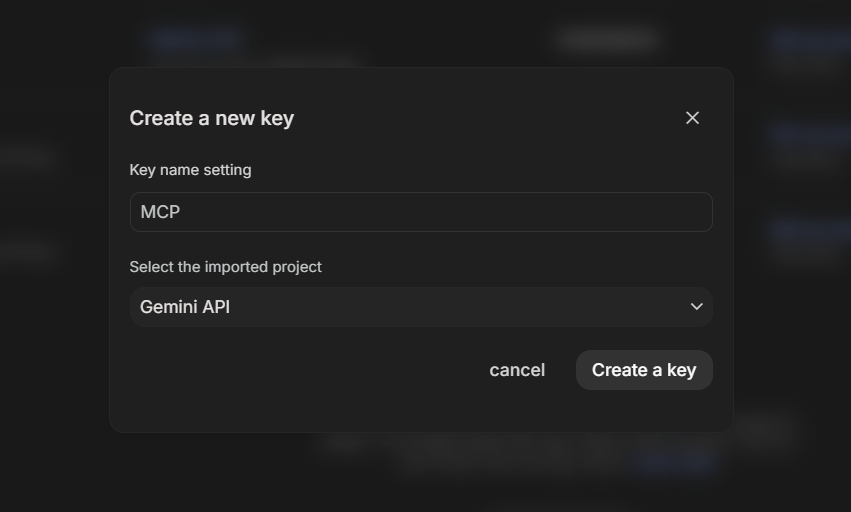
Creating a Gemini API key in Google AI Studio: naming the key and selecting the Gemini API project.
Next, the custom host/agent creates an MCP Client and connects to the server over stdio. The path computation and the tool-call limit live in the full source.
// client/client.ts

import { Client } from "@modelcontextprotocol/client";
import { StdioClientTransport } from "@modelcontextprotocol/client/stdio";

const transport = new StdioClientTransport({
  command: process.execPath,
  args: ["--import", "tsx", serverPath],
  env: { ALLOWED_ROOTS: process.env.ALLOWED_ROOTS ?? "" },
});
const mcpClient = new Client({ name: "file-organizer-agent", version: "1.0.0" });
await mcpClient.connect(transport);
Verification environment on 2026-08-27: Windows 11, Node.js 24.15.0, @modelcontextprotocol/client 2.0.0, @modelcontextprotocol/server 2.0.0, @google/genai 2.17.0, Zod 4.4.3, tsx 4.23.12 and TypeScript 7.0.2. MCP TypeScript SDK v2 splits client and server into two packages; v1 used the combined @modelcontextprotocol/sdk package.
mcpToTool converts the discovered MCP tools into the interface Gemini uses. This is an integration specific to @google/genai, and it is still experimental in version 2.17.0; another provider's SDK may need a different adapter or tool-calling loop.
import { GoogleGenAI, mcpToTool } from "@google/genai";

const ai = new GoogleGenAI({ apiKey: process.env.GEMINI_API_KEY });
try {
  const response = await ai.models.generateContent({
    model: MODEL,
    contents: USER_REQUEST,
    config: {
      tools: [mcpToTool(mcpClient)],
      automaticFunctionCalling: { maximumRemoteCalls: MAX_TOOL_CALLS },
    },
  });
  console.log(response.text);
} finally {
  await mcpClient.close();
}
Full source of the custom host/agent
Claude Desktop and Claude Code are MCP Hosts that can register this server; other platforms may support MCP as well. When switching model provider, the File MCP Server and the tool contract can stay unchanged, but the host/agent side usually has to change SDK, API key, adapter, and possibly the tool-calling loop.
To organize a real folder, run:
npm run agent -- "absolute_path"
Running the demo: real results on 500 files
The run finished with 2 tool calls: one list_files and one move_files. The results land under storage/inbox/organized/<extension>/<year>/<month>/<day>/. The images below are the transcript and the directory structure of that run.
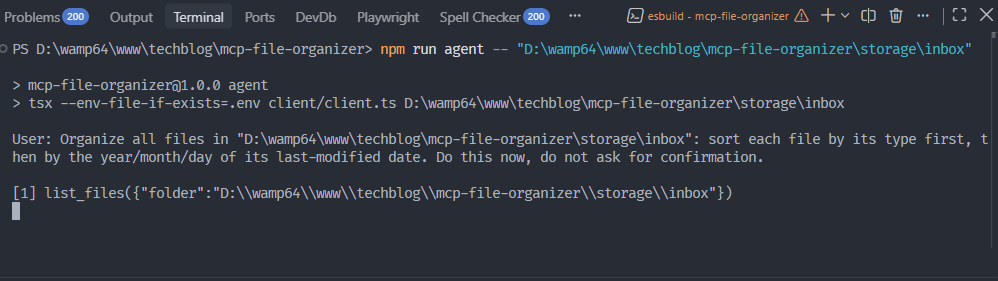
The terminal at the start of the run: the npm run agent command and the first list_files call.
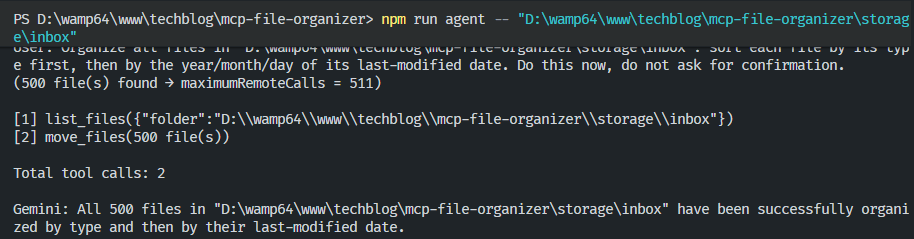
The terminal at the end: the last move_files call, 2 tool calls in total, and the completion message from Gemini.
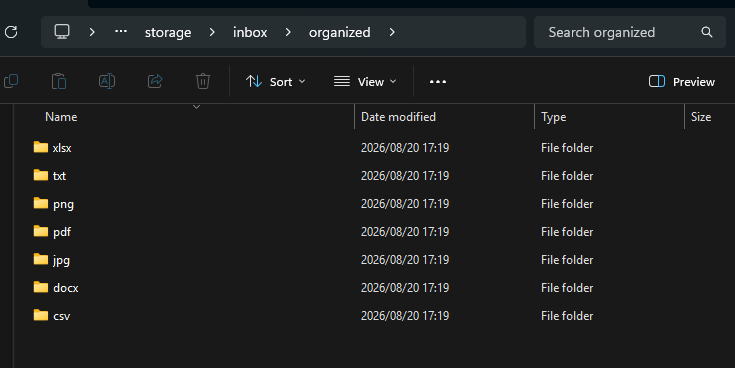
The organized folder after the run, split across 7 extensions: xlsx, txt, png, pdf, jpg, docx, csv.
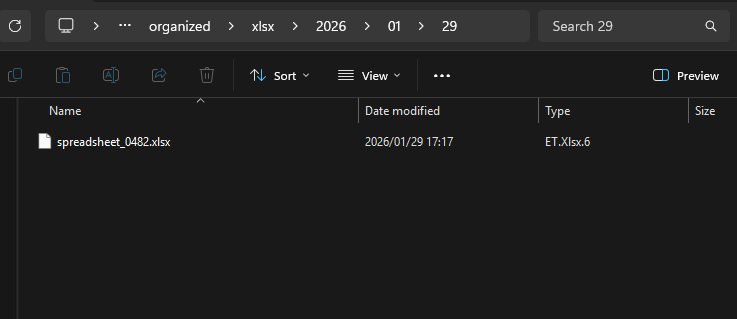
One specific subfolder: organized/xlsx/2026/01/29 holds exactly 1 file matching that modification date.
Much tidier, isn't it? To find something you only need to remember the extension and the modification date, and that is it.
Registering this server in Claude Desktop or Claude Code
client.ts is a host written by hand for the demo. Another way to use it is to register the built server file in Claude Desktop or Claude Code; the host then manages the connection, tools/list, and the tool-calling loop.
For Claude Desktop, open Settings → Developer → Edit Config and edit claude_desktop_config.json. A normal installation on Windows uses %APPDATA%\Claude\claude_desktop_config.json. The Microsoft Store build may use the MSIX path at %LOCALAPPDATA%\Packages\<PackageFamilyName>\LocalCache\Roaming\Claude\claude_desktop_config.json.
Paths declared in this file must be absolute. If the file does not exist yet, create it:
{
  "mcpServers": {
    "file-organizer": {
      "command": "node",
      "args": ["absolute_path/dist/server/server.js"],
      "env": { "ALLOWED_ROOTS": "C:\\Users\\you\\Downloads" }
    }
  }
}
ALLOWED_ROOTS has to contain exactly the folder you intend to organize: the example above only allows Downloads, so to try it on the demo's mock data, change it to the absolute path of storage\inbox.
For Claude Code, the project scope uses a .mcp.json file at the project root. A relative path in .mcp.json is resolved against the working directory of the Claude Code process rather than the location of the file, so use an absolute path, or the ${CLAUDE_PROJECT_DIR:-.}/dist/server/server.js variable that Claude Code sets for the server subprocess.
Result with Claude Desktop
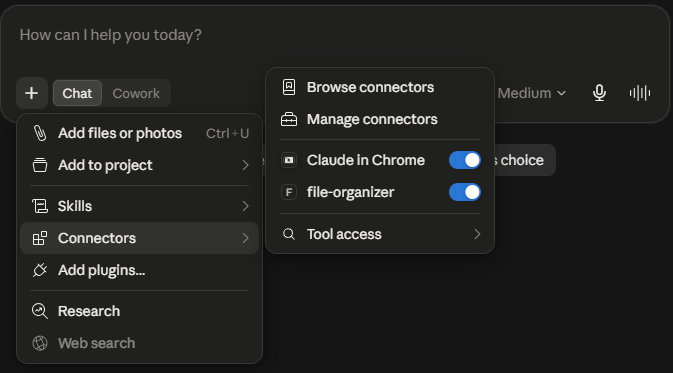
Claude Desktop: enabling the file-organizer connector under Connectors.
Result with Claude Code
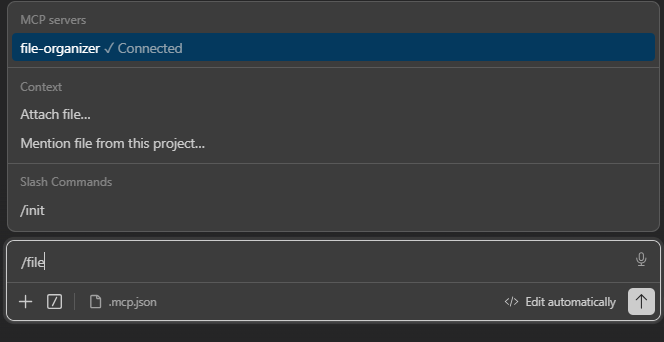
Claude Code: the file-organizer MCP server showing Connected through .mcp.json.
Reproducing it on the real Downloads folder:
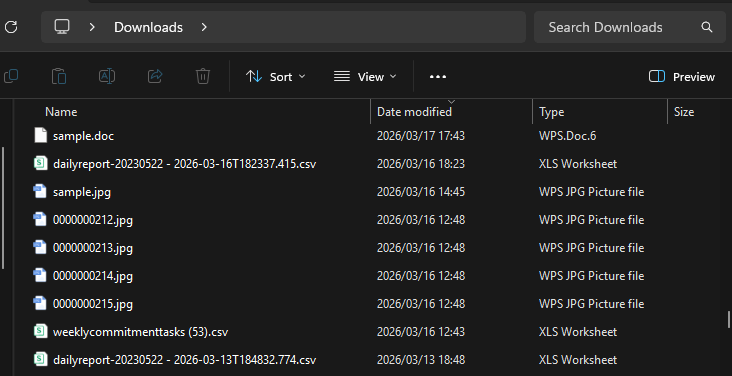
The real Downloads folder on the machine, used to try the demo outside the mock data.
Claude finds the tool it needs from the MCP server on its own:
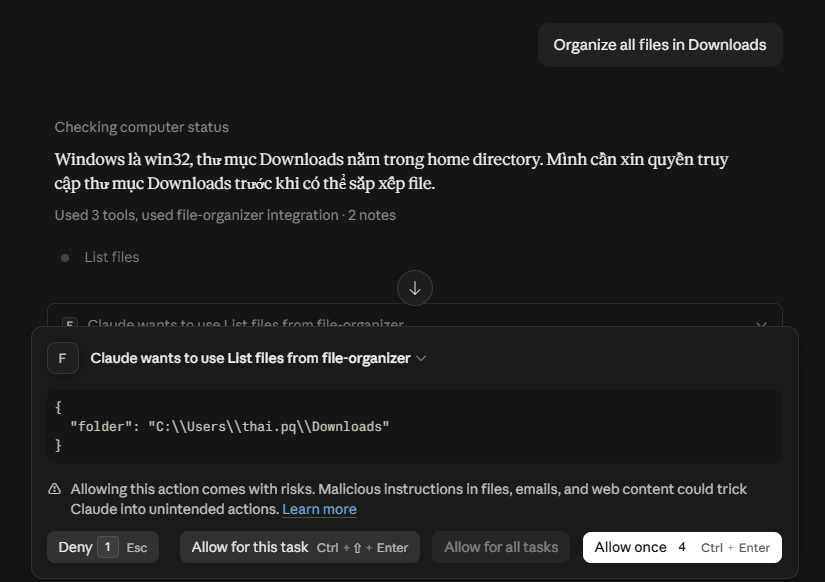
Claude chooses to call the List files tool from file-organizer and asks for permission before reading the Downloads folder.
What MCP actually standardizes
The demo shows three standardized parts:
- Discovery: the client fetches tools and schemas at runtime through tools/list.
- Invocation: the client calls every tool through tools/call and receives results in the MCP structure.
- Implementation boundary: the agent depends on
list_files,move_files, not directly onfs.readdirorfs.rename.
Architecturally — the backend behind list_files, move_files can change from the local file system to Google Drive, OneDrive, or S3 while the way the agent understands and calls the tools stays the same:
                MCP Server
                    │
        ┌───────────┼───────────┐
        ▼           ▼           ▼
   Google Drive   OneDrive      S3
MCP separates the agent's understanding of the tool contract from the way the server implements the tool.
When MCP is worth the integration cost
MCP fits when a capability needs to be reused by several hosts, models, or development teams; when the tool list has to be discovered at runtime; or when the server needs to keep the boundary between permissions and business logic independent of the agent. Examples include looking up stock levels in an ERP, fetching shipment status, querying internal reports, and creating tickets.
If only one application calls one simple API, a direct adapter is usually less code. If the problem is fully determined, such as "sort files by extension", a plain script is still cheaper and more predictable than standing up a whole agent to decide for itself — even when that agent already uses a batch tool like move_files.
How to run this demo yourself
The most direct way to experience the demo is to register the server in an existing MCP host — Claude Desktop or Claude Code — and then type the request in natural language in the chat box, exactly the way MCP is used in practice. The steps below apply on Windows with Node.js LTS.
1. Clone the repo and open PowerShell in the folder you just cloned: git clone https://github.com/bwv-labs/mcp-file-organizer.git, then cd mcp-file-organizer.
2. Run npm ci to install the exact versions in the lockfile.
3. Run npm run test, then npm run generate-mock to create 500 files in storage/inbox.
4. Run npm run build to produce dist/server/server.js.
5. Register the built JavaScript file as described above, and set ALLOWED_ROOTS to exactly the folder you will organize — here, the absolute path to the repo's storage\inbox.
6. Restart the host or open a new session, then ask it to organize that mock folder.
Example prompt:
Organize all files in D:\path\to\mcp-file-organizer\storage\inbox
Check which permissions the host is applying before allowing the tool to write files. After the run, look at the results under storage/inbox/organized.
Conclusion
MCP solves the problem stated at the start of the article: instead of every application–API pair needing its own adapter, one MCP Server can serve many compatible hosts, bringing the integration cost from roughly n × m closer to n + m when the components are genuinely reused. A fixed script is still simpler for a stable classification rule. The value of the demo is that the same MCP Server file served both a custom host/agent using Gemini and Claude Desktop, without changing the contract of list_files and move_files.