BLUE/GREEN DEPLOYMENT
Hello everyone, my leader assigned me a task, and honestly, I felt a bit depressed when I heard it: “Hey, we’re about to release the new version of application A to production. Could you help me with the deployment?”
The app is already running in production, and just the thought of touching it makes me break out in a cold sweat. I started picturing a not-so-bright scenario:
1. Long downtime causing users to be unable to access the app.
2. What if the deployment fails and the service crashes? Do we need to back up and restore? How long will that take?
3. Even worse, what if we can’t roll back and lose data… I’d probably have to pack my bag and leave for good.
After that I started frantically searching Google with keywords like “how to deploy without downtime,” “zero downtime deployment” and then realized an interesting concept called “Blue/Green Deployment.”
At first, it was quite confusing, but after a while, I suddenly realized… this was exactly what I had been looking for! Today, I’d like to share this “lifesaver” with you all.
1. What is Blue/Green Deployment?
Before introducing Blue/Green Deployment, let’s take a look at how a traditional deployment process usually works. Suppose we have only one production environment and each time we want to deploy the application, the process typically goes like this:
1. Notify users about the maintenance window and send an apology message.
2. At the scheduled time, shut down the server. All users are disconnected and see a “503 Error” or a “Maintenance in progress” message on the screen.
3. The development team quickly carries out the deployment process.
4. Restart the server and hope everything runs smoothly without any unexpected errors.
This traditional approach causes several problems:
- Downtime is inevitable: Users cannot access the system.
- High risk of errors: If there’s a bug (for example, a payment logic issue), end users will be affected immediately.
- Difficult rollback: When the server encounters an issue and you need to restore the previous version, you must repeat the entire deployment process, it makes another round of downtime.
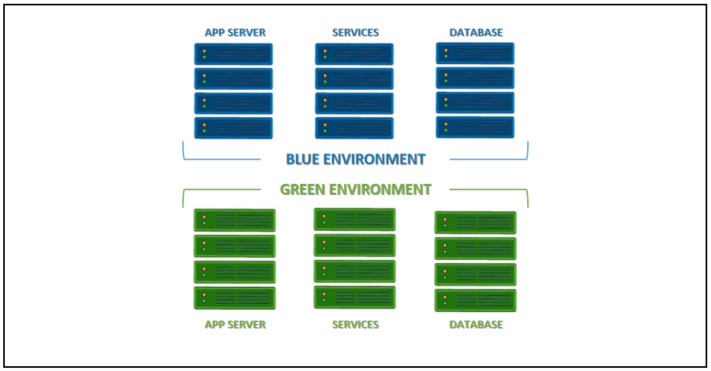
To address the issues mentioned above, Blue/Green Deployment was introduced as an optimal solution. To understand, it is a software deployment strategy designed to minimize downtime and risk by using two parallel production environments with identical configurations, called “Blue” and “Green.”
In particular:
- Blue environment: The live environment currently serving real users. This represents the stable, running version.
- Green environment: A cloned version of the Blue environment. This is where the new version of the application is deployed and tested without affecting the Blue environment.
2. How does Blue/Green Deployment work?
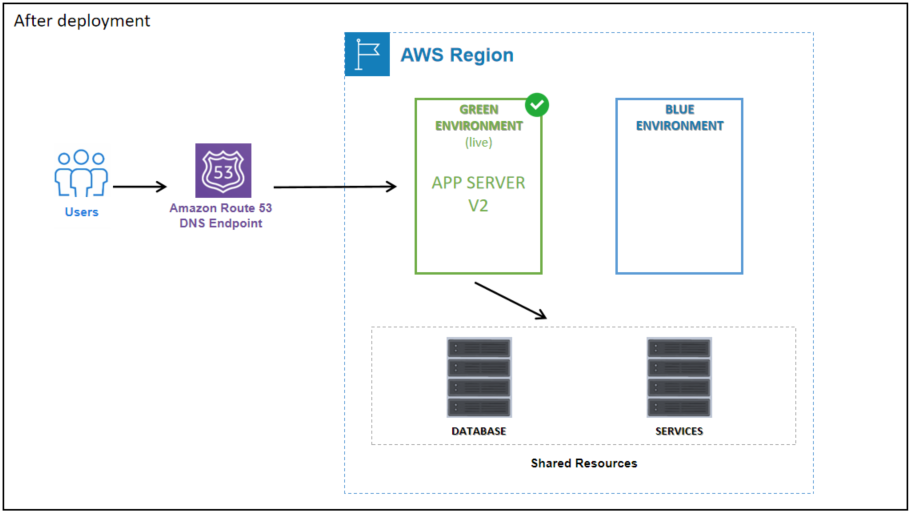
Basically, Blue/Green Deployment operates by running two identical environments in parallel to minimize service downtime. This method duplicates the entire live environment, including servers, virtual machines, containers, configurations, and databases to create a separate but completely identical environment to the current one.
However, Blue/Green Deployment does not usually require duplicating the entire system. In particular, synchronizing data between two separate databases is highly challenging. Instead, shared components such as the database are often used by both environments. This approach reduces cost and complexity, as long as changes are carefully managed to prevent service disruption.
The deployment process using the Blue/Green model takes place as follows:
1. Initially, users are served by the current version running in the Blue environment.
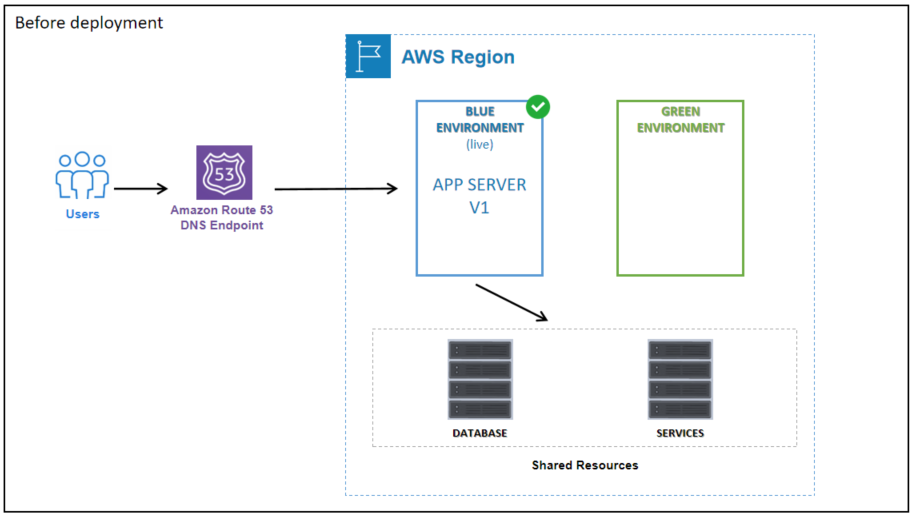
2. Next, the new version of the application is deployed to the Green environment by creating a copy of Blue.
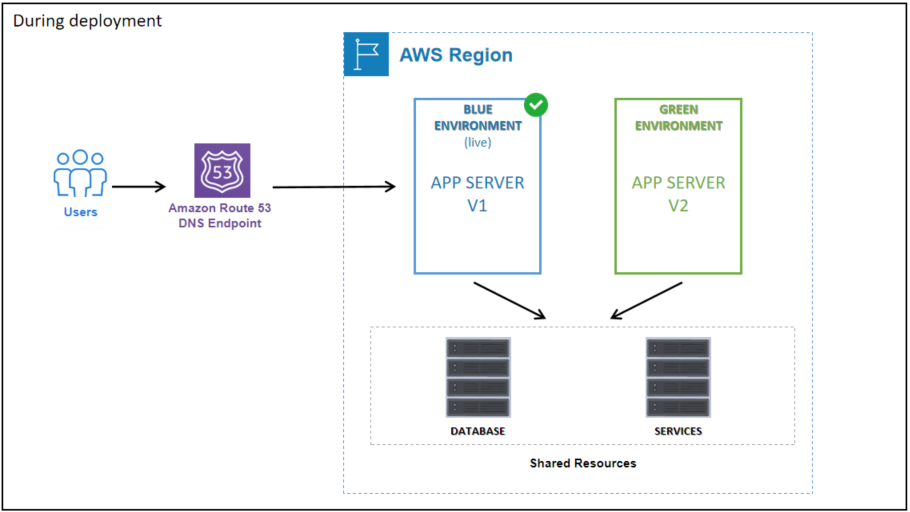
3. Once the Green environment is stable, the router or load balancer is switched to direct traffic to Green. This process reduces downtime to almost zero. After the switch, Green officially becomes the live environment, while Blue serves as a backup, ready to be reactivated if a rollback is needed in case of issues.
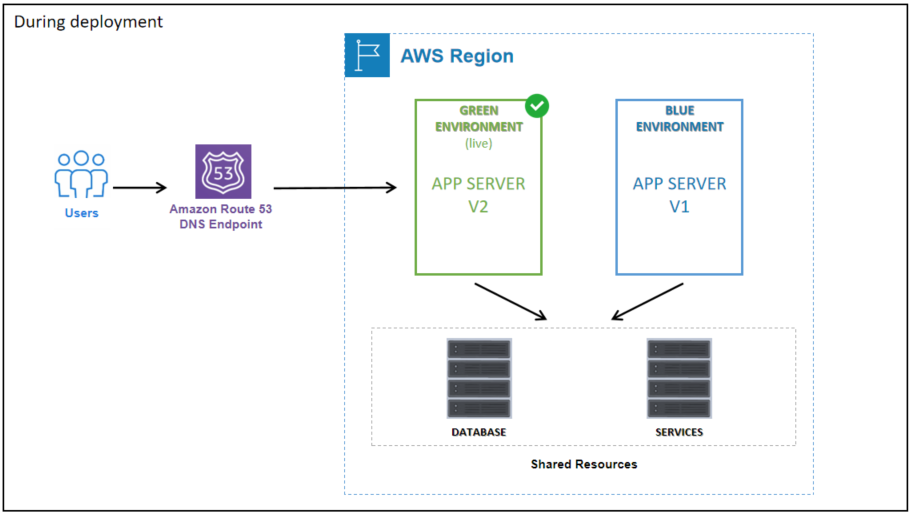
4. After monitoring and confirming that Green is operating smoothly, you can either keep the Blue environment as a backup for the next deployment or remove it entirely to lower operational costs and free up infrastructure resources.
3. Applications of Blue/Green Deployment
Blue/Green Deployment is not only a safe solution for deploying new versions but is also suitable for many critical operational scenarios:
- Application Release: This is the most common application, used to deploy new releases of Web applications, APIs, or Microservices. The new version allows for full testing on a copy of the production environment before traffic is switched over.
- Infrastructure Upgrade: Blue/Green allows for the safe modification of fundamental infrastructure components. This avoids patching or upgrading directly on the environment currently running production traffic.
- Database Management: This is often the most challenging part of the deployment process. Blue/Green requires a suitable migration strategy to ensure backward compatibility: the Green environment must be able to run with the old schema, and the Blue environment must also tolerate the new schema in case of a rollback. The good news is that many cloud platforms, such as AWS RDS, now support a Blue/Green mechanism even for database version upgrades (e.g., MySQL 5.7 → 8.0).
4. Advantages and Disadvantages of Blue/Green Deployment
4.1. Advantages
- Minimized downtime: You can deploy upgrades without interrupting service. Users are not affected thanks to traffic being rerouted via the Load Balancer or DNS.
- Fast and safe rollback: If a bug is detected in the new environment, you simply switch the traffic back to the old environment (Blue) immediately.
4.2. Disadvantages
- High infrastructure cost: Maintaining two environments with equivalent configurations is required, which results in doubling the resource cost (servers, databases).
- Complex database management: Databases are often shared and hard to isolate. When making major schema changes, the new application version must be designed to be backward compatible.
Reference documents:
https://docs.aws.amazon.com/whitepapers/latest/blue-green-deployments/introduction.html
https://www.blazemeter.com/blog/blue-green-deployment-testing
https://martinfowler.com/bliki/BlueGreenDeployment.html
https://docs.aws.amazon.com/AmazonRDS/latest/UserGuide/blue-green-deployments-overview.html