AI-Powered Test Automation: From Manual to Automated Testing
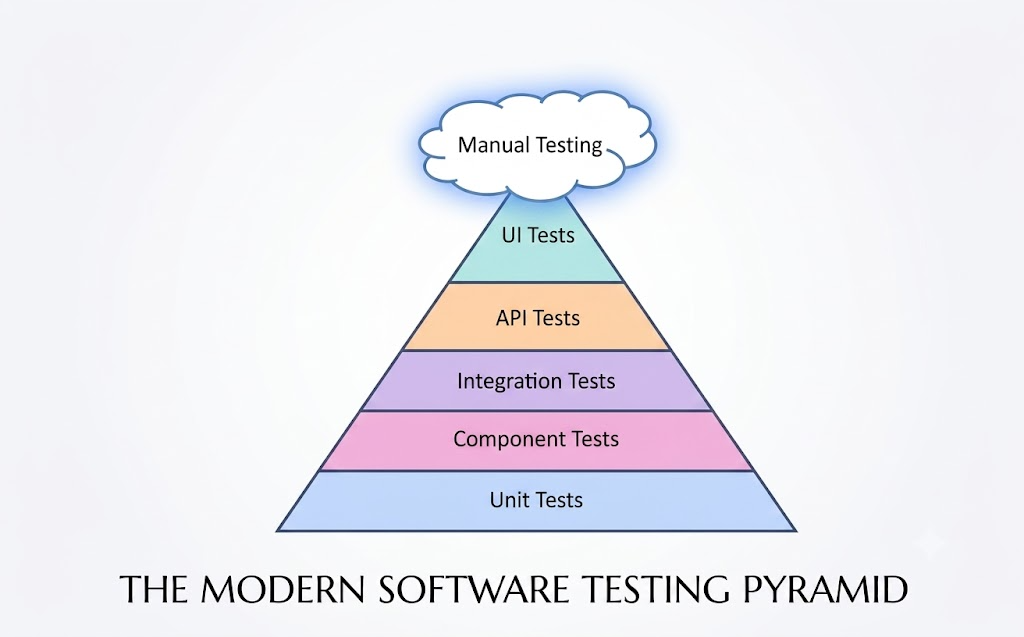
Image 1: Modern Testing Pyramid
Image Source: Article The Evolution of the Testing Pyramid by James Willett
When starting the journey of transitioning from Manual Testing to Automation Testing, the biggest obstacle often lies not in learning programming syntax, but in changing the testing mindset. To build a solid automation strategy, understanding the role and position of each layer in the testing pyramid is the first step.
The testing pyramid model visually divides testing levels from foundation to apex:
- Unit Tests (UT): Located at the widest bottom layer, focusing on checking the correctness of individual functions or smallest logic blocks in the source code. This is the fastest and most cost-effective testing layer for detecting bugs.
- Component Tests (CT): Tests an isolated UI component (e.g., label, color, placeholder, etc.) or module functionality before integration.
- Integration Tests (IT): Verifies interaction and data flow between merged modules.
- API Tests: Checks data communication ports and processing logic between the server and the application.
- UI Tests (E2E Tests): Placed near the top of the pyramid, simulating full end-to-end user interactions on the interface.
- Manual Testing: Placed at the top of the testing pyramid, representing exploratory testing, evaluating actual user experience, and handling flexible scenarios that automated scripts cannot fully replace.
When mastering this overall picture, the COM team will know exactly where to apply automation for maximum value. The rise of AI now acts as a powerful lever, helping COM shorten scriptwriting time, standardize testing processes, and smoothly transition to the Automation Test model.
*Note: The article focuses only on Automated Testing excluding API Tests because API Tests are usually suitable for large Microservices projects, which are outside the scope of this article on changing processes from Manual → Automated Testing.
Testing Process Structure With AI
Using free-form prompts directly in chat windows often leads to scattered and unstable results. AI easily falls into speculating logic or missing critical edge cases.
To operate automated testing in practice, the project needs to be organized into a clear process. This process is based on fixed rules layers to define common standards, combined with two independent testing pipelines clearly separated by system layers.
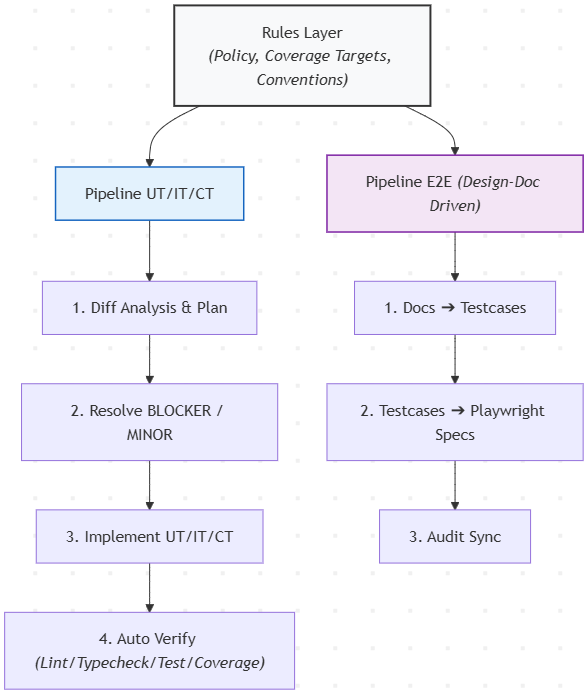
Image 2: Testing Process
1. Establishing Project Rules
Before allowing AI to initialize scripts or write test code, the project must establish a governance ruleset. This is considered a technical policy that all AI agents and developers must comply with.
- Testing Strategy: Clearly defines the role of each testing layer. UT and CT act as technical shields at the source code level, responsible for covering all processing functions and single UI components. Meanwhile, IT and E2E Tests focus on directly converting conditions from the old manual testing checklist into Automation Tests. This layer also details the script review process between Developers and COM, along with technical standards when writing test code.
- Coverage Targets: Converts old manual testing checklists into coverage target matrices for each directory or module. Core business logic modules (e.g., payment processing, numerical calculations) require 100% absolute coverage, while shared directories only need a minimum threshold of 80%. The project maintains a matrix file to clearly classify which conditions are automated and which are kept for manual testing.
- Script Coding Standards: Uniformly specifies interface identifier conventions, directory structure, test naming rules, and data mocking principles applied in the project.
2. UT and IT Pipeline
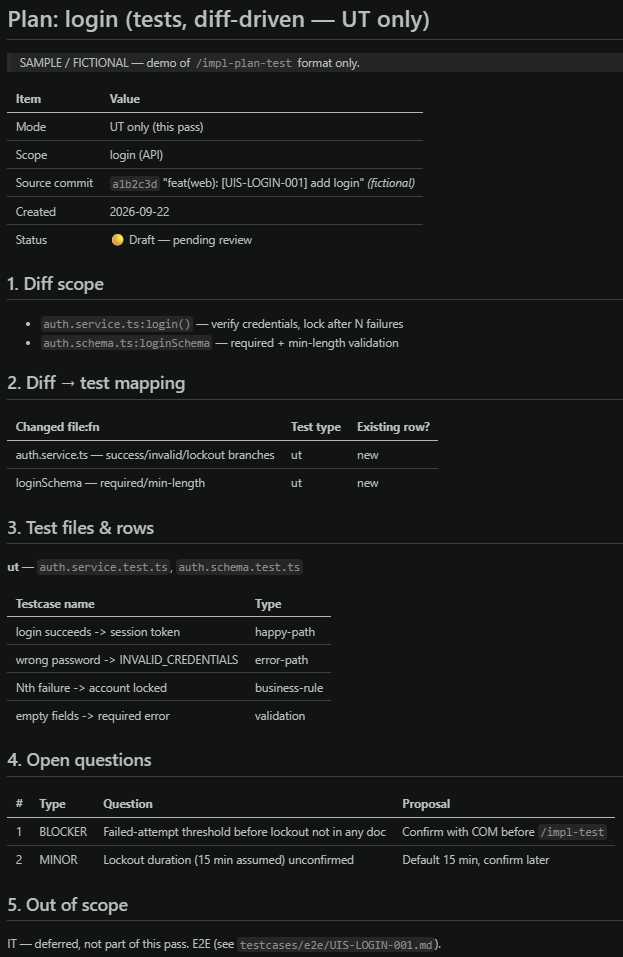
Image 3: Unit Test Plan
This pipeline serves the creation of Unit Tests, Integration Tests, and Component Tests for Developers. The workflow operates based on actual source code changes rather than scanning the entire project, while placing Component Tests at the lower layer to check single UI components (like buttons, input fields, data tables, etc.) to reduce the load on E2E tests above.
- Scoping with Git diff: AI analyzes Git commit diffs to accurately identify modified functions, logic branches, or UI components. AI cross-references these changes with API description documents or corresponding component designs to allocate required test scripts (UT, IT, or Component Test) and outputs a plan file.
- Problem Classification using BLOCKER and MINOR tags: During planning, if inconsistencies are detected between business docs, mocks, execution code, or related info, AI does not arbitrarily guess logic. Instead, AI tags outstanding questions directly in the plan file:
- BLOCKER: Used for severe logic contradiction bugs or missing spec info. The process stops to clarify everything first.
- MINOR: Used for minor details about formatting or parameters. AI proposes a default option while keeping a warning tag.
Moving to the test code writing step is only performed once all BLOCKER tags in the plan have been resolved by Developers. - Separation of Boundaries when Writing Test Code: The agent receives the approved plan file to write test code. This Agent is restricted in access: strictly not allowed to modify application source code. If a test fails, the Agent must keep the failing test to report a bug, preventing the AI from arbitrarily patching product code to pass tests.
- Automated Verification Loop: Every test file created by AI must undergo a mandatory check sequence including linter, typecheck, running tests, and checking coverage thresholds.
3. E2E Pipeline
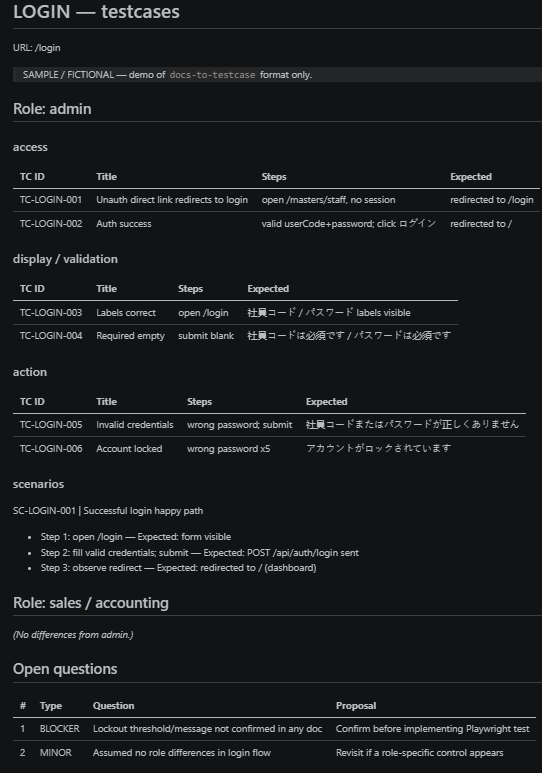
Image 4: E2E Test Plan
Unlike UT, IT, and Component Tests, the E2E pipeline operates based on interface design documents to ensure objectivity and independence from current application source code. Since the lower Component Test layer handles detailed display states of individual widgets, E2E scripts only need to focus on business flow testing describing user actions across multiple system screens.
- Converting Documents into Test Scripts: AI reads external screen design documents to translate them into standardized Markdown test scenario files. Single test cases and multi-step scenarios are packaged in standardized template structures.
- Converting Test Scripts into E2E Code: AI compiles test scenarios into complete Playwright spec files, applying Page Object Model design patterns and asserting expected text directly from design documents. If the actual application behaves differently from the script, the test fails to record a bug rather than editing the script to fit the app.
- Testcase Sync Audit: A read-only audit tool runs periodically to compare plan script inventories with actual code tests, immediately detecting missing, redundant, or incomplete scripts.
Designing Automation Reports
When transitioning from manual testing to automation, the biggest barrier between Developers, COM, and Project Managers is context breakdown.
In traditional manual testing checklist files, data is clearly divided by Screen name, Function group, user permissions, and detailed step-by-step operations. Conversely, default automated test reports usually only output a list of source files or function names alongside simple pass/fail status. This makes it very hard for COM to review and impossible to know if scenarios are missed.
To solve this problem, the automated report interface needs to be designed as a central dashboard, integrating comprehensive high-level and detailed information so readers instantly grasp system quality status without opening source code.
1. Essential Information Components on Reports
Automated test reports need to provide multi-dimensional views, from overall system health down to detailed business scenarios. Essential information structure includes three main blocks:
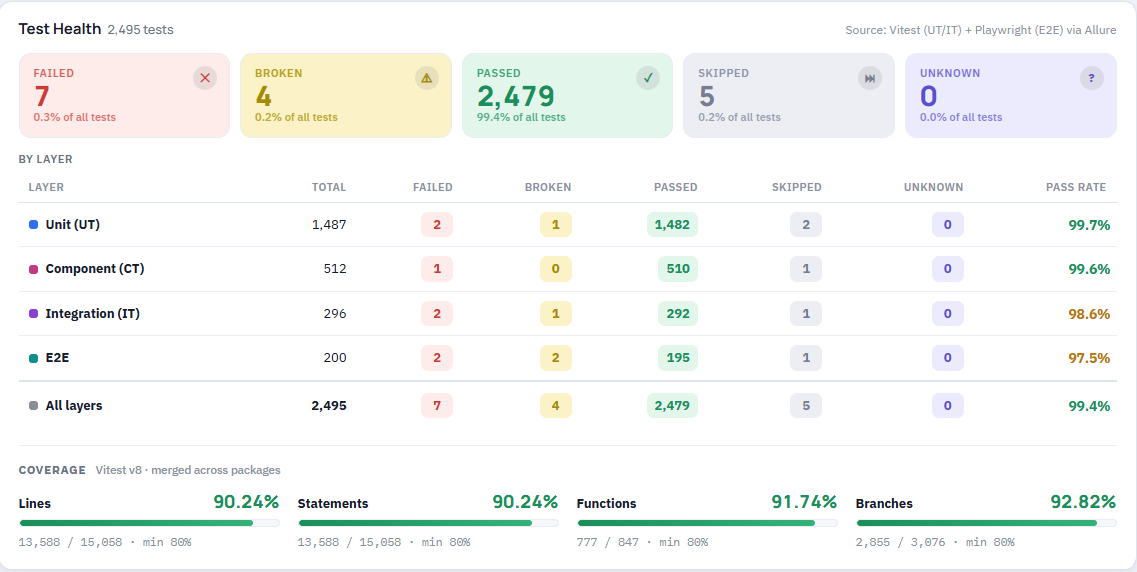
Image 5: Test Health Description in Test Report
- Test Health Metrics & Test Coverage:
- Summary table of total tests in the system, visually classified into 5 states: Passed, Failed, Skipped, Broken, Unknown.
- Statistical matrix of test counts and Pass Rate separated by each testing layer including UT, CT, IT, and E2E.
- Test Coverage metrics automatically aggregated from measurement tools, displaying exact percentage code coverage across 4 criteria: Lines, Statements, Functions, and Branches, along with safety minimum thresholds (min 80%).
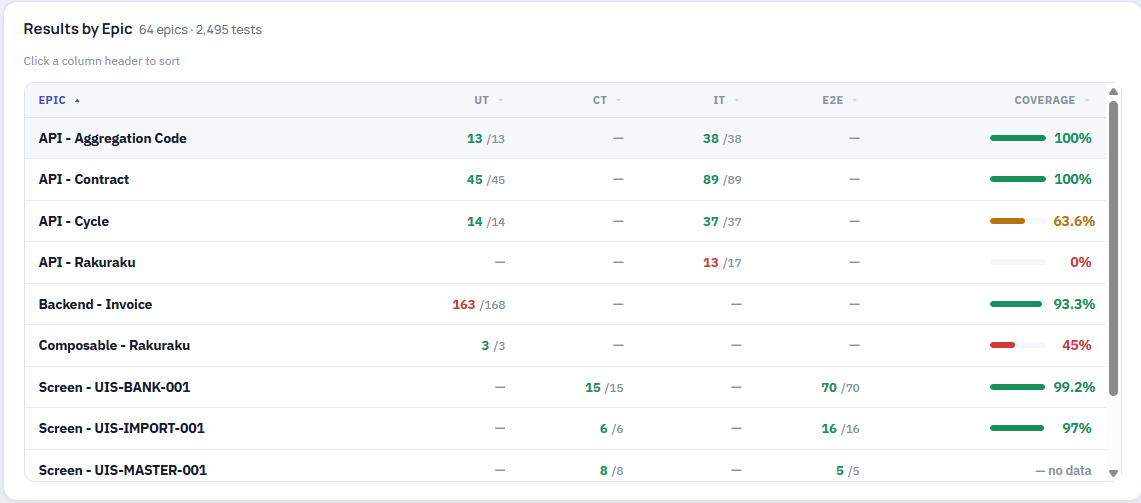
Image 6: Overall Results by Epic
- Results Grouped by Screen and Function (Results by Epic):
- Category list detailing all Screens, Backend APIs, or other Components classified as Epics.
- Information columns clearly displaying Pass/Total test counts for UT, CT, IT, and E2E layers corresponding to each Screen or API, alongside individual Test Coverage rates.
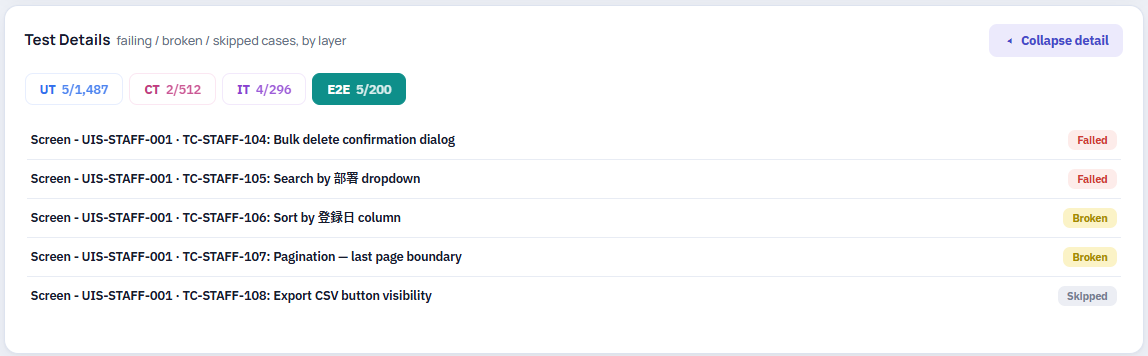
Image 7: Failed Testcase Details
- Details for Non-Passing Test Cases (Test Details):
- Expandable area showing broken (Failed/Broken), skipped (Skipped), or unclassified (Unknown) test cases.
- Supports filtering by test layer (UT, CT, IT, E2E) so readers instantly pinpoint issues.
2. Standardizing Test Case IDs and Names
Naming tests based on programming conventions is the primary reason auto-reports become obscure to COM. For readers to understand 100% of test content, test names in code must follow naming rules tied to the initial business checklist.
Test names must contain original Screen code, test scenario ID, and behavior description in business terms. Example:
- Login scenario: Screen - UIS-LOGIN-001 · TC-LOGIN-001: Enter username, password & click login button return dashboard page successful.
When exporting reports, COM only needs to look at Screen code UIS-LOGIN-001 and test case ID TC-LOGIN-001 to cross-reference immediately with original files.
3. Clear Separation of Scenarios Across Testing Layers
Based on original scenario checklist files, allocating scenarios to the correct processing layer is key to balancing software quality and system execution speed:
- UT & CT Layers:
- Unit Test (UT): Handles input data validation rules (schema, format, length, required fields), algorithms, and business calculations.
- Component Test (CT): Checks display states and trigger events of individual components, buttons, or input fields in isolation.
- Tests in these two layers run in milliseconds, providing instant feedback to Developers when code changes.
- IT Layer: Focuses on complex Backend business logic, user authorization processing, database data calculation rules, and API communication error cases.
- E2E Layer: Does not repeat validation or display checks of individual inputs. E2E focuses exclusively on main user journey flows across multiple consecutive Screens (e.g., New Contract Creation → Invoice Export → Send Email).
Clear separation prevents test suite redundancy, keeping report execution times fast while ensuring full coverage.
4. Quick Review and Detection of Omitted Scenarios
The central dashboard interface provides a 3-layer review mechanism helping COM and Project Managers immediately detect missed scenarios:
- Review by Screen Category: In the Results by Epic table, if a Screen shows dashes (—) across all test layers or status No data, readers immediately recognize this feature lacks automated test code.
- Warnings from Test Coverage Metrics: When a Screen or API reports a low Test Coverage percentage (e.g., 63.6%), this warns that many Branches or Functions are unexecuted. This indicates Edge Cases or validation error rules not covered by tests.
- Instant Failure Classification in Detail List: The Test Details section allows COM to collapse Passed tests and focus solely on Failed/Broken test lists by UT, CT, IT, or E2E layers, making incident isolation fast and accurate.
Thanks to this centralized organization, cross-checking between business checklists and automated code occurs extremely quickly, maintaining transparent project quality without extra management costs.
Common Problems in Automated Testing
1. Test Flakiness Management
Flaky tests (passing and failing intermittently) usually stem from UI asynchronous behavior and resource contention on the DB Server when multiple E2E scenarios run concurrently.
- Ban Fixed Delays & Enforce Conditional Waiting: Hard pauses like sleep or delay are strictly forbidden. Test code must use Explicit Waits or Web-first Assertions to automatically listen for API responses and DOM states, optimizing execution speed.
- DB Infrastructure Optimization & Concurrency Throttling: To prevent DB Server overload causing random timeouts during E2E runs, configure parallel worker limits matched to infrastructure capacity, optimize connection pools, and bypass setup steps via API instead of unnecessary UI operations (weigh trade-offs carefully).
- Scenario-Level Auto Retry for E2E: For E2E tests failing due to infrastructure noise or transient network latency, automatically trigger retries before reporting final results.
2. Test Data Isolation
A common cause of subsequent test failures is previous tests modifying or deleting shared sample data in the database.
- Independent Data Self-Initialization: Every test must prepare its required dataset via API prior to execution.
- Automatic Teardown/Cleanup: Immediately after test completion, trigger cleanup routines to delete or reset temporary data created.
- Prohibit Data Sharing in Concurrent Runs: Never share sample datasets across parallel executions to prevent data collisions.
3. Execution Time Optimization & Suite Accuracy
As test suites grow to thousands of scenarios, prolonged execution times clog CI/CD pipelines. Furthermore, manual inspection easily misses orphan or missing test cases.
- Execution Time Optimization (Parallel Execution & Targeted Run): Configure multi-threaded parallel execution to maximize hardware resource utilization. Apply smart targeted test runs based on Git Diff instead of rerunning the entire suite.
- Managing Accuracy via Audit Sync & Coverage Thresholds: Periodically run read-only audit checks (Audit Sync) to cross-reference plan scenarios against actual test code, detecting orphan or omitted cases. Enforce coverage regression checks on pull requests to prevent submitting untested code.
Conclusion
Transitioning from Manual Testing to Automation Testing is a journey of upgrading workflows and quality management mindsets. AI support significantly shortens scriptwriting time, but long-term project success hinges on building a rigorous process: Clearly defining layer responsibilities, establishing guardrails against code bias, and maintaining transparent reporting for stakeholders.
When these factors align, the automated test suite becomes a solid shield safeguarding software quality throughout the development lifecycle.
References
- https://www.james-willett.com/the-evolution-of-the-testing-pyramid/
- https://learn.cypress.io/testing-foundations/the-testing-pyramid
- https://nocode.autify.com/blog/top-6-test-automation-challenges
- https://www.datadoghq.com/knowledge-center/flaky-tests/
- https://apidog.com/blog/spec-first-api-development/